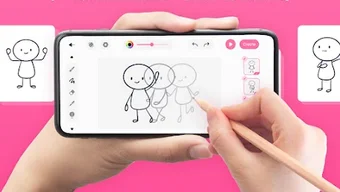

Download Make Animation - Draw 2D Anim – 2D animation, draw and animate, flipbook app, create animations, animation tool, free animation software, mobile animation, digital flipbook, animated stories, draw on screen
Overview
Make Animation - Draw 2D Anim is a mobile application designed to empower users to create animated content directly on their Android devices. The software enables individuals to draw and animate their ideas frame by frame, offering a digital flipbook experience tailored for both beginners and creative hobbyists. Its primary purpose is to simplify the animation process, allowing users to bring characters, scenes, and stories to life without requiring advanced technical skills or professional tools.
Target users include aspiring animators, digital artists, students, and anyone interested in storytelling through motion graphics. The app is particularly suited for those who want to experiment with animation in a low-pressure, accessible environment. Real-world use cases include creating short animated clips for social media, developing visual narratives for educational content, or producing personal projects such as animated greeting cards and digital comics.
The developer, Anim8, has positioned the software as a free tool aimed at democratizing animation creation. While no additional background on the developer was provided, the app’s focus on ease of use and creative freedom suggests a user-centric design philosophy. The app supports saving and sharing animations in common formats like GIF and MP4, facilitating quick distribution across platforms.
Key Features & Capabilities
- Frame-by-Frame Animation: Users can draw each frame individually, enabling precise control over motion and timing. This method supports smooth transitions and detailed animation sequences.
- Digital Flipbook Interface: The app replicates the traditional flipbook experience using a touchscreen interface, allowing intuitive navigation between frames and real-time preview of animation flow.
- On-Screen Drawing Tools: Built-in tools let users sketch directly on the screen with customizable brushes, colors, and line thickness, supporting both freehand drawing and structured design.
- Export Options: Completed animations can be saved as GIFs or MP4 files, making it easy to share creations on social media, messaging apps, or video platforms.
- Simple Project Management: Users can create, save, and revisit multiple animation projects, allowing for iterative development and long-term creative work.
These features support a wide range of creative workflows. For example, a student might use the app to visualize a science concept through a short animated explanation, while a hobbyist could craft a playful character moving across the screen. The ability to export in standard formats ensures compatibility with most digital platforms, enhancing usability and reach.
User Interface, Workflow & Performance
The user interface of Make Animation - Draw 2D Anim is structured around a clean, minimal layout optimized for touch-based interaction. Navigation is primarily gesture-driven, with intuitive controls for switching between frames, adjusting canvas size, and accessing drawing tools. The app’s workflow emphasizes simplicity: users begin by creating a new project, then proceed to draw each frame sequentially, with real-time playback available to assess motion quality.
Performance observations are based on general software behavior patterns. The app operates within the Android ecosystem and is designed to function efficiently on modern mobile devices. However, exact performance details such as CPU or RAM usage were not specified by the developer. Stability during extended use or large project handling has not been documented. Users may experience varying performance depending on device hardware and the complexity of animations.
Overall, the interface prioritizes ease of use and visual clarity, minimizing clutter and focusing on core animation tasks. The app’s responsiveness to touch input suggests a smooth user experience on compatible devices, though specific benchmarks are unavailable.
Compatibility & System Requirements
Make Animation - Draw 2D Anim is designed for Android devices. The current version is 1.5.1, with a file size of 48.2 MB. This indicates a lightweight installation that should fit comfortably on most modern smartphones and tablets.
Platform compatibility information is limited to Android. The developer did not specify exact device requirements, such as minimum Android version, screen resolution, or hardware specifications. As a result, users should ensure their device meets general Android app standards to run the application smoothly.
Exact system requirements were not listed. Compatibility with older Android versions or specific hardware configurations remains unconfirmed. Users are advised to check their device’s compatibility before installation.
Pros and Cons
Pros
- Free to download and use with no hidden costs.
- Intuitive digital flipbook interface ideal for beginners.
- Supports frame-by-frame animation for detailed control.
- Offers export options in widely supported formats (GIF, MP4).
- Lightweight installation at 48.2 MB.
Cons
- Only available on Android; no support for iOS or desktop platforms.
- No information provided on advanced features like layer management or audio integration.
- Exact system requirements and performance benchmarks not disclosed.
- Limited to mobile use, which may restrict workflow for users preferring desktop tools.
- Version details beyond 1.5.1 were not specified.
FAQ Section
Is Make Animation - Draw 2D Anim available for iOS devices?
The app is currently only available for Android. There is no official version for iOS devices at this time.
Can I use this app offline?
Yes, once installed, the app can be used without an internet connection, making it suitable for on-the-go animation creation.
Are there in-app purchases or ads?
The software is listed as free, but the developer did not specify whether ads or in-app purchases are present. Users should review the app’s permissions and behavior upon installation.
How do I export my animations?
Completed animations can be exported as GIF or MP4 files directly from the app, enabling easy sharing across social media and messaging platforms.
Does the app support audio in animations?
Information regarding audio integration was not provided. The app may not include built-in audio features, though users can potentially add sound externally after export.
Final Thoughts + CTA
Make Animation - Draw 2D Anim stands out as a capable and accessible tool for mobile-based animation creation. Its focus on simplicity, combined with a functional digital flipbook interface, makes it a strong choice for beginners and hobbyists exploring animation. While it lacks advanced features and desktop support, its lightweight design and free access lower the barrier to entry for creative expression.
For users seeking a straightforward way to draw and animate on Android, this app delivers a solid experience. It’s particularly well-suited for educational projects, personal storytelling, and quick social media content. While more robust tools exist for professionals, this app fills a niche for casual creators who value ease of use and immediate results.
Download Make Animation - Draw 2D Anim now





.png)

